
Table of Contents
- Roles and access
- How it works in Huma
- Step 1: Create a new vacation policy
- Step 2: Assign employees to the new policy
- Keep track of who qualifies
Roles and access
| Access | Role |
|---|---|
| Create policies and assign employees | System role: Absence → Absence management |
How it works in Huma
Huma does not automatically reassign employees to a new vacation policy when they reach a certain age. Instead, you manage this manually by creating a separate vacation policy with the correct number of days, and reassigning qualifying employees to it.
This is a straightforward process, but it requires that someone in your organisation keeps track of which employees are turning the relevant age, for example 60, and reassigns them at the right time.
💡 A good practice can be to check the Jubilees section on the dashboard regularly, as it shows upcoming work anniversaries and birthdays. This can serve as a reminder to reassign employees to the correct policy when they qualify.
Step 1: Create a new vacation policy
- Go to the Absence module
- Navigate to "Settings"
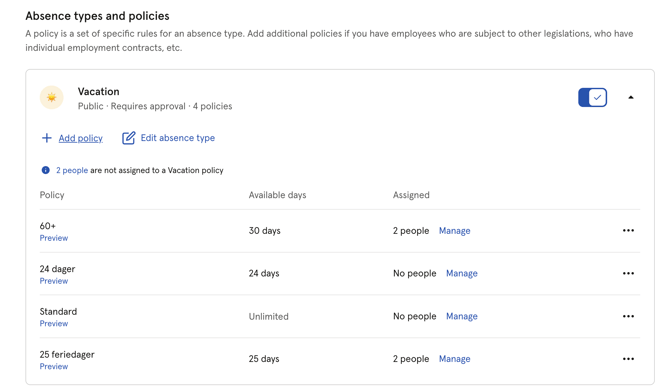
- Scroll down to "Vacation" and click on it
- Click "Add policy"
- Fill in the details:
- Give the policy a clear name — e.g. "Vacation — 60 years and above"
- Set the same time period as your standard vacation policy
- Set the correct number of days including the extra entitlement — e.g. 30 days if the standard is 25
- Do not set this as the default for new employees
- Click "Save"
Step 2: Assign employees to the new policy
Once the policy is created, assign the qualifying employees to it. Make sure to set the effective date to match the date they become entitled to the extra days, typically their 60th birthday or the start of the vacation year in which they turn 60, depending on your organisation's policy.
- Go to the People module and open the employee's profile
- Navigate to the "Absence" tab
- Click the three dots next to "Vacation"
- Click "Manage policies"
- Click "+ Assign to a new policy"
- Select the new policy
- Set the effective date
- Click "Assign to policy"
💡 Make sure to set the correct effective date. If you leave it empty, the new policy will override all previous vacation policy assignments for that employee.
🔗 Read more about assigning employees to absence policies.
Keep track of who qualifies
Since Huma does not automatically trigger a policy change when an employee reaches a certain age, it is important to have a process in place for tracking this.
A few practical tips:
- Use the Jubilees section on the dashboard to monitor upcoming birthdays
- Export your People data regularly and filter by date of birth to identify employees approaching the relevant age
- Consider adding a recurring task or process in Huma as a reminder to review and reassign employees at the start of each vacation year