
Table of Contents
- Roles and access
- What is Insights?
- Available metrics
- Compare insights
- Filter insights by group
- Filter insights by date
- What the numbers are based on
- How full-time equivalent (FTE) is calculated
- Exclude employees from Insights
- List excluded employees
- Export users
- FAQ
Roles and access
| Access | Role |
|---|---|
| See insights for the entire organisation | System role: Insights |
| See insights for specific groups | User role: See insights — granted over the relevant teams, locations or companies |
💡 With a user role, you can only see insights for the groups you have been granted access over. Only members of those groups will appear in the charts.
What is Insights?
Insights gives you quick access to key HR metrics and demographic data for your organisation, all in one place. You can see statistics such as headcount, gender distribution, age distribution, contract types and more, either for the entire organisation or for specific groups.
Insights always reflects the current state of your organisation by default, but you can also select a specific date in the past to view historical data, or compare metrics between two different dates.
Available metrics
| Metric | Description |
|---|---|
| Quick overview | A summary of key numbers — total headcount, new hires and more |
| Age distribution | How employees are distributed across age groups |
| Gender distribution | The gender breakdown across the organisation |
| Turnover | The percentage of employees who left the company during the year, calculated against the average number of employees |
| Employees by year | How headcount has changed over time |
| Average age | The average age of employees |
| Average seniority | The average length of service across employees |
| Contract type | The distribution of contract types across positions |
| Contract type by gender | Contract type distribution broken down by gender |
| Employment percentage | The distribution of full-time and part-time employees |
| Employment percentage by gender | Employment percentage broken down by gender |
| People by location | How employees are distributed across locations |
| People by team | How employees are distributed across teams |
| People by company | How employees are distributed across companies |
| Nationality | The nationality breakdown across the organisation |
| Supervisor by gender | The gender distribution among supervisors |
| People by organisation | How employees are distributed accross organisations (relevant for accounts with multiple companies) |
💡 Hover over charts for more details. Contract type metrics reflect the number of positions, not the number of employees. This is marked clearly in the relevant charts.
Compare insights
Sometimes a single snapshot is not enough. The "Compare insights" feature lets you place two sets of insights side by side, so you can see how your organisation has changed over time, or how different parts of the organisation compare to each other.
- Go to the Insights module
- Click "Compare insights"
- Choose the date and group(s) you want to compare against
- The charts show both sets of insights side by side
💡 Some useful ways to use this:
- Year over year — compare headcount and demographics from January 1st this year vs January 1st last year
- Before and after a restructuring — compare the organisation before and after a major change
- Two departments — compare the Marketing team and the Sales team on the same date
- Growth tracking — compare the organisation at the start of a quarter vs the end
💡 Both sets of filters are fully independent, and you can mix different dates and different groups in the same comparison.
Filter insights by group
You can filter all insights by teams, locations, companies or organisations to narrow down the data to a specific part of your organisation.
- Go to the Insights module
- Use the filter options at the top to select the relevant teams, locations or companies
- All charts update automatically based on your selection
💡 If you have a user role, only groups you have been granted access over will be available in the filter.
Filter insights by date
You can view insights for a specific date in the past and not just today. This lets you analyse how your organisation looked at any point in time, for example at the start of the year or before a major restructuring.
- Go to the Insights module
- Click the date field in the top left to pick a date
- All charts update automatically to reflect the organisation as it was on that date
💡 The date filter defaults to today. All numbers are based on who had an active position on the selected date.
What the numbers are based on
Insights includes all employees who have an active position, meaning their first workday is in the past and their last workday is in the future.
- If a first workday is missing, it is interpreted as a date in the past
- If a last workday is missing, it is interpreted as a date in the future
- Employees who have been manually excluded from Insights are not included in the numbers
💡 To see how the numbers are calculated, click "What are the numbers based on?" in the Insights module.
💡 To correctly calculate age-related metrics, employees need to have a contract start date set.
How full-time equivalent (FTE) is calculated
The Full-time equivalent figure in Quick overview shows the total FTE for the selected date. FTE is based entirely on position percentage and there is no separate full-time/part-time flag.
- 100% position = 1.0 FTE
- An employee's FTE = the sum of all their active position percentages ÷ 100
- If an employee has two 50% positions, they count as 1.0 FTE
Exclude employees from Insights
You can manually exclude specific employees from all Insights calculations. This is useful for employees who should not be included in statistics, for example board members, consultants or other non-standard roles.
You need a system role with User management access to exclude employees.
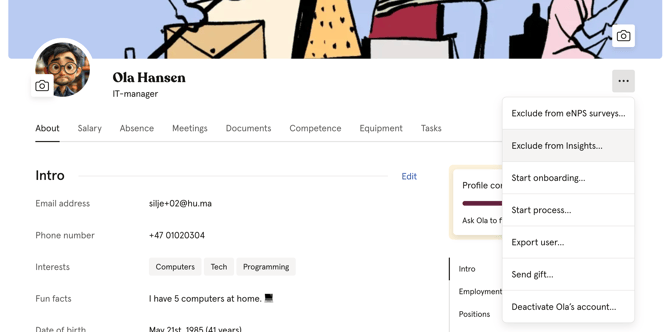
- Go to the People module and open the employee's profile
- Click the three dots in the top right corner
- Click "Exclude from Insights"
💡 To include the employee again, follow the same steps and click "Include in Insights".
List excluded employees
You can see a full list of employees who have been excluded from Insights.
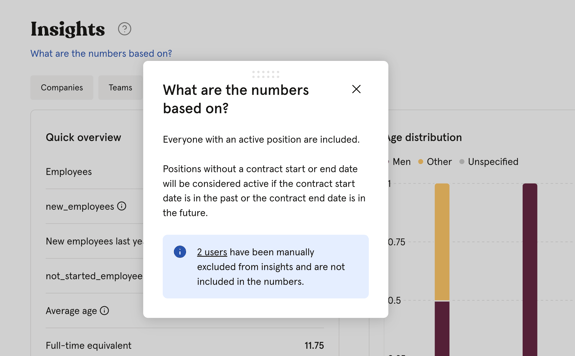
- Go to the Insights module
- Click "What are the numbers based on?"
- Click on "X users are excluded" to view the list
💡 If you have a user role, you will only see excluded employees from the groups you have been granted access over.
Export users
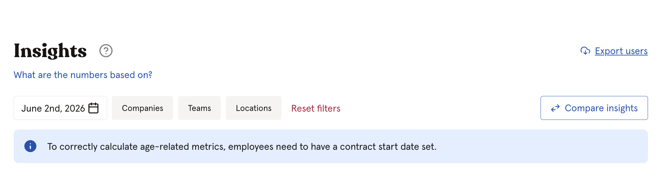
The Insights module includes an "Export users" button that lets you export employee data directly without navigating to the People module. The export follows the same flow and options as the People export.
💡 Exporting requires a system role with Users → User export access.
🔗 Read more about how to export People data.
FAQ
Are insights updated automatically?
Yes. Insights always reflect the current state of your organisation by default. You can also select a specific date in the past to view historical data.
Can I export insight data?
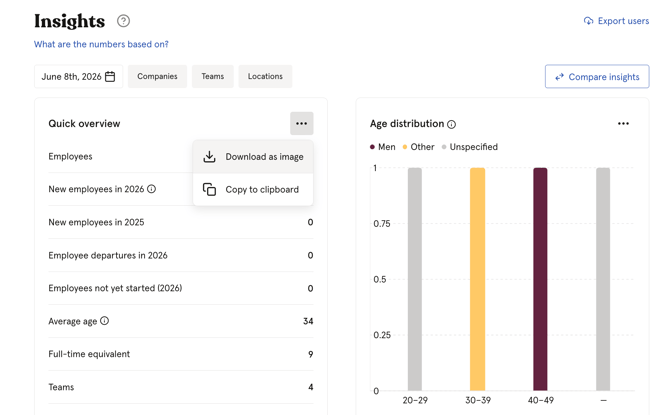
You cannot export all Insights data in one go. However, you can download individual charts as images or copy them to your clipboard. Click the three dots (•••) in the top right corner of any chart to see the options.
Can I view historical data or filter by time period?
Yes. Use the date filter to select a specific date and view insights as they were on that day. You can also compare insights between two different snapshots using the "Compare insights" feature.
Can I create custom dashboards or reports?
No. The available metrics are predefined and cannot be customised at this time.
How is turnover calculated?
The turnover figure in Quick overview shows the percentage of employees who left the company during the year, calculated against the average number of employees during the same period.