
Table of Contents
- Roles and access
- Set up case handlers
- The whistleblower portal
- Overview of incoming cases
- Handle a case
- Case statuses
- Following up in Huma
- Close and reopen a case
- The archive
- FAQ
Roles and access
| Access | Role |
|---|---|
| Handle whistleblowing cases | System role: Whistleblowing → Whistleblowing case handling |
| Activate whistleblowing and add case handlers | System role: Roles and permissions |
💡 When Whistleblowing is activated, Huma automatically creates a locked system role called "Whistleblowing handler". You can assign this role to relevant people during setup or at any time afterwards via System settings → Roles.
Set up case handlers
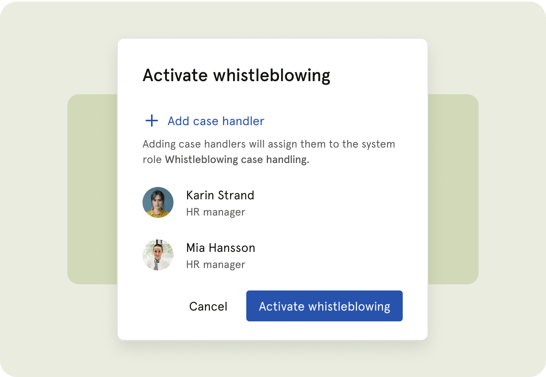
Before the Whistleblowing module is put to use, you must designate at least one case handler. Without a case handler in place, incoming reports cannot be handled and organisation administrators will receive a notification prompting them to set one up.
To add case handlers during initial setup:
- Go to "Whistleblowing"
- Click "Set up whistleblowing"
- Add the relevant people as case handlers
- Click "Activate"
To add or change case handlers after activation:
- Go to System settings → Roles
- Go to "System roles"
- Find the "Whistleblowing handler" role
- Add or remove people as needed
⚠️ Only users with a Roles and permissions system role can add or remove case handlers.
The whistleblower portal
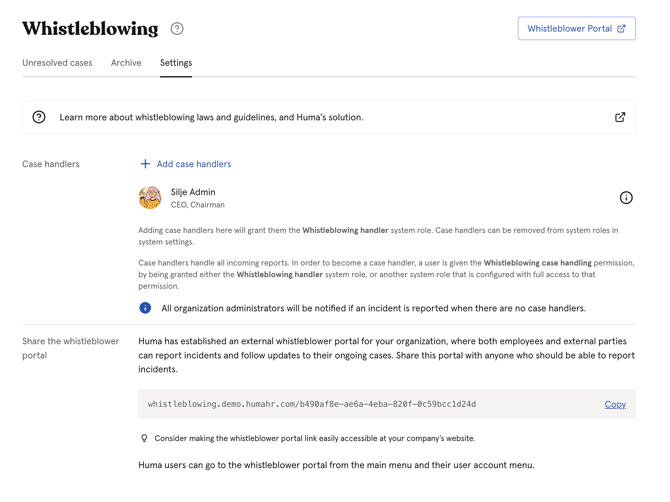
When Whistleblowing is activated, Huma creates an external portal where anyone can submit a report. You can find and share the portal link from the Whistleblowing module.
- Go to the Whistleblowing module
- Click on "Settings"
- Click "Whistleblower portal" to view and copy the link
- Share the link with employees and anyone else who should be able to report
💡 Consider making the portal link easily accessible, for example on your company website, intranet or in your employee handbook.
Overview of incoming cases
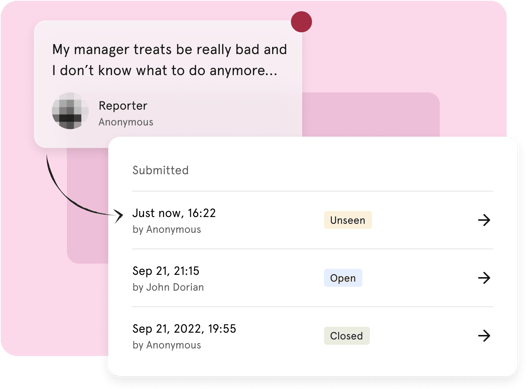
All incoming cases are listed in the Whistleblowing module. For each case you can see:
- Case number
- Submission date
- Current status
- Last action
💡 You can filter cases by status to get an overview of what needs attention.
Handle a case
When a new case arrives, open it to review the report and begin the follow-up process.
- Go to the Whistleblowing module
- Click on the case you want to handle and "I acknowledge and open case"
- Review the report — you can see the description, submission date, case number and whether the reporter is anonymous or named
- Communicate with the reporter by sending messages directly in the case
- Update the case status as the investigation progresses
- Close the case when the investigation is concluded
💡 All communication happens within the case. If the reporter chose to remain anonymous, their identity is never revealed, even when exchanging messages.
💡 If the reporter provided a notification email address, they will receive an email whenever you send a message or update the case.
Case statuses
| Status | What it means |
|---|---|
| Unseen | The case has been received but not yet opened by any case handler |
| Seen | A case handler has opened the case |
| Open | The case handler is actively working on the case |
| Closed | The case has been concluded |
💡When you open a case for the first time, the status automatically changes from "Unseen" to "Seen". When you acknowledge the case and begin active follow-up, update the status to "Open".
Following up in Huma
Once you have received a report and begun your investigation, you can use other parts of Huma to structure the follow-up process, depending on whether the reporter is anonymous or not.
If the reporter is not anonymous:
- Meetings — Schedule a one-on-one meeting directly in Huma to follow up in person, document the conversation and assign action points
- Processes — Create a process to ensure all required steps in the investigation are completed in the right order and assigned to the right people
- Tasks — Assign specific follow-up tasks to relevant people directly in Huma
If the reporter is anonymous:
- Use Processes and Tasks to manage the internal investigation without involving the reporter directly, keeping all communication within the whistleblowing case itself
💡 Any follow-up activity in Huma should be handled with care and discretion. Make sure only the relevant people have access to the information involved.
Close and reopen a case
To close a case:
- Open the case in the Whistleblowing module
- Click "Close case"
- Optionally add a closing message to the reporter
- Confirm
⚠️ Once a case is closed, no more messages can be sent by either party. Both the reporter and the case handler can reopen the case within 1 month of it being closed. After that, the case cannot be reopened.
To reopen a case:
- Open the closed case
- Click "Reopen case"
- Confirm
The Archive
Cases that are closed are automatically moved to the "Archive" tab in the Whistleblowing module. There is no manual archiving, closing a case is all that is needed. The archive gives you a permanent record of all concluded cases and can be accessed at any time.
💡 Cases in the archive can be reopened within 1 month of being closed. After that, they remain in the archive as a read-only record.
FAQ
Can I change the name of the Whistleblowing module or the portal?
No. The name of the module and the portal are fixed and cannot be customised.
Can multiple people be case handlers at the same time?
Yes. You can assign as many case handlers as needed. All case handlers will receive notifications when a new report is submitted.
Can a case handler see who submitted the report if the reporter chose to remain anonymous?
No. If the reporter chose to remain anonymous, their identity is never revealed, not even to case handlers. Huma does not collect identifying information such as IP addresses or browser data.
What happens if there are no case handlers when a report is submitted?
Organisation administrators receive a notification prompting them to set up case handlers. The report is stored and accessible once a case handler is assigned.
Can I attach files to a case?
Not yet. File attachments are not currently supported in the Whistleblowing module.
What are the legal deadlines for handling a case?
Organisations with employees in European countries must acknowledge the report within 7 days and provide follow-up and feedback within 3 months. Organisations with employees only in Norway must acknowledge within a reasonable time. Huma sends automatic reminders to case handlers if these deadlines are approaching and the case has not been handled.
Can a closed case be deleted?
No. Whistleblowing cases cannot be deleted. They remain in Huma as a permanent record.
Does each case get a unique case number?
Yes. Every report that is submitted automatically receives a predefined case number. This number cannot be changed and is used to identify the case throughout the process.