
Table of Contents
How to fit multiple handbooks into one
In Huma, you have one handbook. But that does not mean everything has to be mixed together in one place. The handbook is really a system of categories and topics where you decide who sees what, which means you can recreate the structure of multiple handbooks within a single one.
The key tools are:
- Categories — to group and separate content visually
- Access control — to decide who sees each topic
- Empty categories — to create visual separators that look like separate handbooks
Use an empty category as a visual divider
One of the most useful tricks in Huma is to create a category with no topics in it. just a name and a short description. This acts as a visual divider in the handbook, making it look and feel like a separate section or handbook.
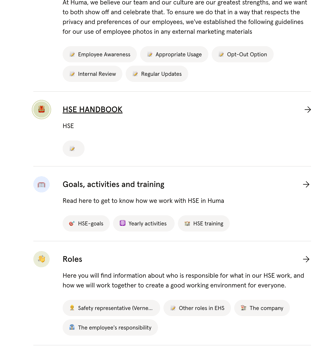
For example, if you want an HSE handbook within your main handbook, you can create a category called "HSE HANDBOOK" with a short description like "HSE". Employees will see this as a clear, distinct section — even though it is all part of the same handbook.
This is how it looks in practice:
💡 Administrators can see empty categories, but they will not be visible to employees unless they contain at least one published topic. Add at least one published topic to the category to make the divider visible to employees.
Common scenarios and how to solve them
Multiple languages
If your organisation has employees in different countries, you can manage all language versions within the same handbook by controlling access at the topic level.
- Create the same topic structure for each language
- Share the Norwegian version with the Norway location
- Share the Swedish version with the Sweden location
- Share content that applies to everyone, such as company values, with everyone
💡 Employees will only see the topics shared with them, so a Norwegian employee will only see Norwegian content, and a Swedish employee will only see Swedish content.
💡 Set the language on each topic to make it even easier for employees to find content in their own language when searching.
An HSE or safety handbook
If you want a dedicated HSE or safety handbook, create it as its own section within your handbook using the empty category trick described above.
- Create an empty category called "HSE HANDBOOK" or similar to act as a visual separator
- Add your HSE topics as categories and topics below it
- Share HSE content with everyone, or with specific locations if it varies by site
This way, employees experience the HSE content as a separate handbook, even though it lives within the same structure.
Department or team handbooks
If different departments need their own content, for example, a sales playbook or an IT onboarding guide, you can create department-specific categories and control who sees them.
- Create a category for each department, e.g. "Sales", "IT", "Finance"
- Add the relevant topics to each category
- Share each category's topics with the relevant team
💡 Employees in Sales will only see the Sales category topics. Employees in IT will only see the IT topics. Everyone can still share a common set of topics at the top of the handbook.
Example: A Norwegian retail company
A retail company with employees in Oslo, Bergen and Trondheim, plus a head office HR team, structures their handbook like this:
| Category | Shared with | Content |
|---|---|---|
| Company handbook | Everyone | Values, benefits, code of conduct |
| HSE HANDBOOK | — | Empty category — visual separator |
| HSE topics | Everyone | HSE routines and guidelines |
| Store staff | Store team | Routines, customer service, safety on the floor |
| HR & admin | HR team | Payroll routines, recruitment guidelines |
Each group of employees sees only what is relevant to them — but it all lives in one handbook that is easy to maintain.