
Table of Contents
- When to transfer document ownership
- Transfer ownership of a single document
- Transfer ownership of multiple documents at once
- What happens when you transfer ownership
- Extend access
- FAQ
When to transfer document ownership
Document ownership should be transferred when:
- An employee is leaving the organisation and owns documents that others need to access
- An employee changes roles and is no longer the right owner for certain documents
- A new document administrator takes over responsibility for a set of documents
- A document was uploaded by mistake by the wrong person
⚠️ If a document owner's account is deactivated without transferring ownership first, no one will be able to manage, edit or delete those documents. We strongly recommend transferring ownership before deactivating any user account.
🔗 Read more about employee data after leaving Huma.
Transfer ownership of a single document
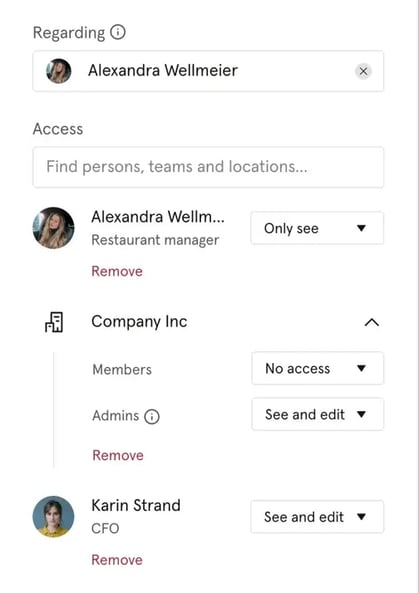
Only the current document owner, or users with "See and edit" access to the document, can transfer ownership.
- Go to the Documents module and open the document
- Click "Document settings" in the right menu
- Click "Access", start typing to search for the new owner, and grant them "See and edit" access
- Choose whether to keep "Only see" access to the document after transferring, if you do not keep access, you will lose access to the document immediately
- Click "Save"
⚠️ Once you transfer ownership, you will no longer be able to edit the document's details unless you have been granted "See and edit" access or the new owner adds you back.
Transfer ownership of multiple documents at once
You can transfer ownership of multiple documents in bulk, which is useful when an employee is leaving and owns many documents.
- Go to the Documents module
- Filter by "Owned only by" and select the employee whose documents you want to transfer
- Select all relevant documents using the checkbox at the top of the list
- Click "Access" in the action bar at the bottom of the screen
- Search for and select the new owner
- Choose whether to keep "Only see" access to the transferred documents
- Click "Save"
💡 You can only transfer ownership of documents you own yourself. If you need to transfer documents owned by someone else, you must first be granted ownership of those documents, or use a system role with "List all documents" access to identify which documents need to be transferred.
What happens when you transfer ownership
| Previous owner | New owner | |
|---|---|---|
| Ownership | ❌ No longer owner | ✅ Becomes owner |
| See and edit access | ❌ Lost, unless "Keep view access" is selected | ✅ Always has full access |
| Can manage access settings | ❌ No longer possible | ✅ Yes |
| Can delete the document | ❌ No longer possible | ✅ Yes |
💡 If you select "Keep view access" when transferring, you will retain "Only see" access to the document. The new owner can revoke this access at any time.
Extend access
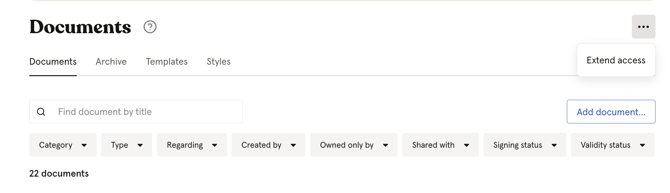
In the Documents module, you may see an "Extend access" button at the top of the page. This button appears when you own one or more documents where you are the only person with "See and edit" access.
To extend access:
- Navigate to the three dots next the "Documents" title
- Click "Extend access"
- Check the box "I understand and wish to proceed"
- Click "Extend access"
Access will be extended to include all users who have a document administrator role over the organisation. Going forward, those administrators will also have "See and edit" access to these documents.
💡 This is particularly useful when a document owner is about to leave the organisation and you want to ensure continuity of access without manually updating each document.
FAQ
Can I transfer ownership of documents I do not own?
No. You can only transfer ownership of documents you own yourself. To transfer documents owned by someone else, that person must first transfer ownership to you, or an administrator must use the "List all documents" system role to identify and manage those documents.
What happens to documents owned by a deactivated user?
The documents remain in Huma but become effectively locked, no one can manage access, edit settings or delete them. This is why it is critical to transfer ownership before deactivating a user account.
Can the new owner revoke my access after I transfer ownership?
Yes. Even if you select "Only see access" when transferring, the new owner can remove your access at any time.
Can I transfer ownership to someone outside my organisation?
No. Ownership can only be transferred to active users within the same organisation in Huma.