
Table of Contents
- Roles and access
- What are job titles?
- Create a job title
- Add a job description
- Generate a job description with AI
- Custom job description on employees profile
- Edit a job title
- Delete a job title
- Assign job titles to employees
- FAQ
Roles and access
| Access | Role |
|---|---|
| Create, edit and delete job titles | System role: Users → User management |
What are job titles?
Job titles in Huma are used to categorise employees by their role in the organisation. When a job title is created, it can be assigned to one or more employees from their profile.
Each job title can have a job description, a text that describes the responsibilities and requirements of the role. This description is shown on the employee's profile unless a custom description has been added directly on the profile.
💡 The job title list is shared across the entire organisation. All job titles created here are available to assign to any employee.
💡 In System settings you manage job titles, on employees profile you can assign them.
🔗 Read about assigning job titles in Huma.
Create a job title
- Go to System settings
- Navigate to "Job titles"
- Click "Add job title"
- Enter a name for the job title
- Optionally add a description
- Click "Save"
⚠️ A job title with the same name cannot be created twice.
Add a job description
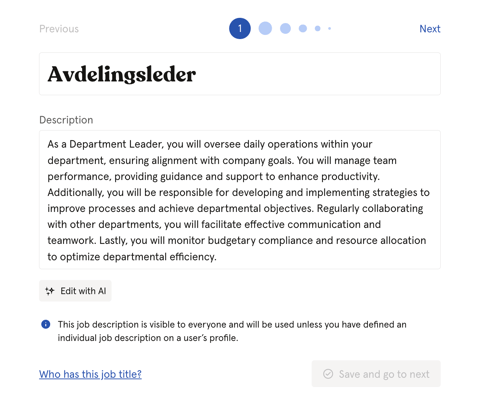
A job description explains the responsibilities and requirements of a role. It is displayed on the profiles of employees who have been assigned this job title, unless a custom description has been set on their individual profile.
- Go to System settings → Job titles
- Click on the job title you want to add a description to
- Click in the "Description" field and write the description
- Click "Save"
Generate a job description with AI
You can generate a job description automatically using the AI Content Assistant.
- Go to System settings
- Navigate to "Job titles"
- Click "Add job title"
- Enter a name for the job title
- Click "Generate description"
- Click "Save" when done
⚠️ AI-generated content may be inaccurate. Always review the output before saving.
💡 You can also use AI for Job titles that are missing job description. Go to the job title and follow the same steps.
Custom job descriptions on employee profiles
In addition to the job title description, you can add a custom job description directly on an individual employee's profile. A custom description will override the job title description for that specific employee.
This is useful when an employee's responsibilities differ from the standard description for their job title.
🔗 Read more about how to add a custom job description on an employee's profile.
Edit a job title
- Go to System settings → Job titles
- Click on the job title you want to edit
- Make your changes and click "Save"
Delete a job title
- Go to System settings → Job titles
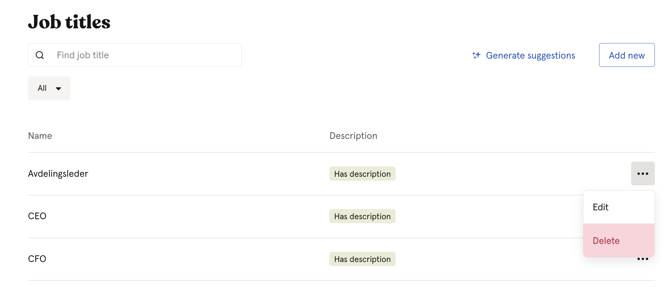
- Click the three dots next to the job title
- Click "Delete" and confirm
⚠️ Deleting a job title removes it from all employee profiles where it has been assigned.
Assign job titles to employees
Job titles are created and managed in System settings, but they are assigned to employees directly from their individual profile. From the job title overview in System settings, you can see which employees currently have a specific job title assigned, but you cannot assign or remove it from here.
To assign or change a job title on an employee:
🔗 Read more about how to assign a job title on an employee's profile.
💡 Click on any job title in the list to see which employees currently have it assigned under "Who has this job title?"
FAQ
Can I add a custom job description on an individual employee's profile?
Yes. If a custom job description is added on an employee's profile, it will override the description set on the job title. The job title description serves as the default for all employees with that title.
Can I see which employees have a specific job title?
Yes. Click on a job title in the list to open it — you will see a "People" section showing all employees currently assigned to that title.
Can two job titles have the same name?
No. Each job title must have a unique name.