Table of Content
What is the supervisor role?
The supervisor role is a special type of user role that gives a person access to their subordinates' profiles specifically. Unlike a manager role, which is granted over a team or location, the supervisor role follows the individual reporting relationship between two people, regardless of which team or location they belong to.
Supervisor vs. Manager — what's the difference?
| Supervisor | Manager | |
|---|---|---|
| Access over | Specific subordinates | All members of a team or location |
| Based on | Individual reporting relationship | Group membership |
| Typical user | Line manager, direct people leader | Team lead, department manager |
| Assigned via | Employee profile or role settings | Role settings |
Subordinates
In Huma, subordinates are the employees who report directly to a supervisor. Every supervisor can view and manage a list of their subordinates, the people for whom they have direct HR or management responsibility. A supervisor cannot be their own subordinate, and Huma does not allow circular chains.
Who should have the supervisor role?
The supervisor role is best suited for someone who has direct responsibility for specific employees, typically a line manager or direct people leader. If you need someone to have access to an entire team or location, a manager user role is more appropriate.
What can a supervisor see and do?
Supervisors have access to the following on their subordinates' profiles:
- Absence
- Onboarding and offboarding
- Processes
- Competence
- Jubilees
💡 The permissions granted to supervisors can be adjusted to fit your organisation's needs. Read more about editing roles in How to manage roles in Huma.
How to assign a supervisor
Only system admins can assign supervisors. There are three ways to do this:
When adding a new person
You can assign a supervisor directly in the add person form, no need to set it up separately afterwards.
Via the employee's profile
- Go to the "People module"
- Click on the employee
- Navigate to "About" and scroll down to "Intro: Supervisor"
- Click "Add person" and pick a supervisor
Via the organisational chart
- Go to the "People module"
- Navigate to "Organisational chart"
- Click the three dots on the relevant employee
- Change supervisor or subordinates directly
💡 When a person is designated as a supervisor, the supervisor role is automatically applied to them — no separate role assignment is needed.
💡 Huma does not allow circular chains of supervisors. People supervised by a person, directly or indirectly, are therefore not available when picking a new supervisor for that person.
🔗 Read a detailed article about how to assign roles in Huma.
How to adjust supervisor permissions
The supervisor role is a predefined user role, but its permissions can be edited to fit your organisation's needs.
- Go to "System settings"
- Navigate to "Roles" and click "User roles"
- Scroll down to "Supervisor" and click on the role
- Click "Edit permissions"
- Adjust permissions between "No access", "Only see" or "See and edit"
🔗 Read more about how to edit permissions for the Supervisor role.
Organisational chart
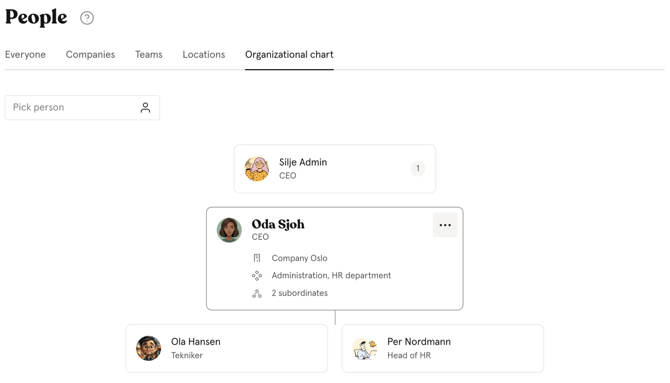
Once a supervisor is assigned, the organisational chart updates automatically to reflect the reporting structure. This gives you a live overview of who reports to whom across your organisation at all times.
Find who’s in charge of who.
- Go to the "People module"
- Navigate to "Organizational chart"
- Click on the different employees to see their position in the chart
- You can also change "Supervisor" and/or "Subordinates" in the organizational chart, by clicking the three dots on each employee in the chart.
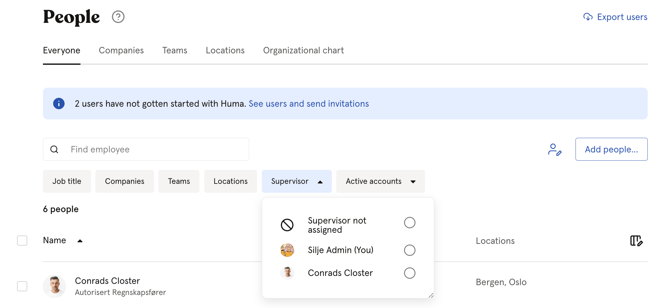
Finding supervisors in the People module
A dedicated filter is available in the People module to help you quickly locate all supervisors in your organisation.
- Go to the "People module"
- Click "Filter"
- Select "Supervisor" from the filter options