
Table of Contents
- What is the absence module?
- How the parts fit together
- The seven absence types
- Absence types, policies and work schedules — how they connect
- Approval — how it works
- Who receives notifications?
What is the absence module?
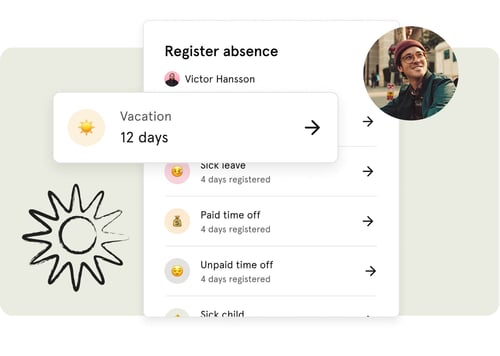
The absence module in Huma gives you a complete overview of all absence in your organisation, from vacation and sick leave to parental leave and unpaid time off. Employees can register their own absence, administrators can manage and approve it, and everything is tracked and exportable.
Before employees can start registering absence, the module needs to be configured. This means setting up absence types, policies and work schedules. Once that is in place, the module runs largely on its own.
🔗 Read more about how to set up absence in Huma.
How the parts fit together
Understanding the relationship between absence types, policies and work schedules is the key to getting the module right from the start.
- Absence types — categories of absence available in Huma, such as vacation or sick leave. Huma comes with seven built-in absence types, and administrators can also create custom absence types based on them. You can enable or disable each one, and configure settings like approval requirements and privacy.
- Policies — the rules that apply to an absence type. For example, how many vacation days employees are entitled to, whether days can be transferred to the next year, and whether the policy follows a calendar year or rolling period. For self-certification, a policy can also use restrictions to limit how many entries employees can register and how long they can be, for example the Norwegian 3 × 4 rule. Each employee can only be assigned one policy per absence type.
- Work schedules — define which days are working days and which public holiday calendar applies. Work schedules determine how absence days are counted, for example, whether weekends and public holidays count as absence days or not.
💡 Think of it this way: the absence type defines what kind of absence it is, the policy defines the rules, and the work schedule defines how days are counted.
The seven base types
Huma has seven built-in absence types, each based on one of seven base types. You cannot rename or delete these built-in types, but you can enable or disable each one and configure their settings. Administrators can also create custom absence types based on any of the seven base types.
🔗 Read more about creating custom absence.
| Absence type | Description |
|---|---|
| Vacation | Annual leave entitlement |
| Self-certification | Short-term sick leave without a doctor's note |
| Sick leave | Longer-term sick leave, typically requiring documentation |
| Paid time off | Additional paid leave outside of standard vacation |
| Unpaid time off | Leave without pay |
| Sick child | Leave to care for a sick child |
| Parental leave | Maternity, paternity or parental leave |
Absence types, policies and work schedules — how they connect
Each absence type can have one or more policies. Policies define the specific rules for that absence type, such as how many days are available, whether unused days can be transferred, and whether the period follows a calendar year or rolls over.
Employees are assigned to one policy per absence type. If your organisation has employees in different countries or with different contracts, you can create multiple policies for the same absence type and assign employees accordingly.
Work schedules are assigned to employees separately and determine how their absence days are counted. An employee on a Monday-to-Friday schedule will not have weekends counted as absence days, while an employee on a shift schedule may have different working days defined.
💡 If an employee is not assigned to a policy, they cannot register absence of that type. Always make sure new employees are assigned to the correct policies.
🔗 Read more about absence types.
🔗 Read more about absence policies.
🔗 Read more about work schedules.
Approval — how it works
Whether an absence entry requires approval depends on two things: the absence type settings, and who is registering the absence.
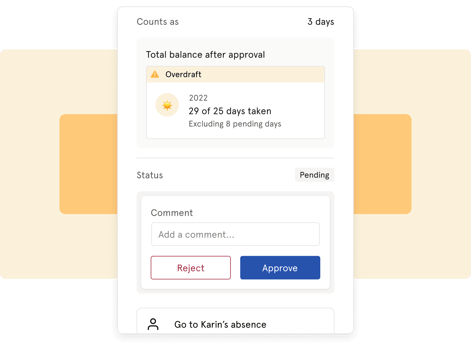
When is approval required? Approval is configured per absence type. If "Require approval" is enabled for an absence type, employees who register that absence will have their entry set to "Pending" — waiting for approval.
Who can approve?
The following users can approve absence:
- Users with a system role: Absence management
- Users with a user role: See and edit → Absence
When is absence automatically approved?
If the person registering the absence has a system role with absence management or a user role with absence access, for example an administrator registering absence on behalf of an employee, the absence is automatically approved, even if the absence type requires approval.
💡 This is one of the most common sources of confusion: a user with absence management access who registers absence on behalf of an employee will always get it automatically approved. regardless of the approval setting on the absence type.
What about the Supervisor role?
The Supervisor role is not used for absence approval. It is only relevant for sick leave follow-up — where the supervisor is responsible for following up with the employee during a sick leave period.
If you want a manager to approve absence without it being automatically approved, make sure they have a user role with absence access, not a system role with absence management and not the Supervisor role.
⚠️ If a manager has a system role with absence management, any absence they register will be automatically approved, even if the absence type requires approval. If you want managers to go through the approval flow themselves, give them a user role with absence access instead of a system role.
🔗 Read more about roles, approvals and notifications in Absence.
Who receives notifications?
Huma sends automatic notifications related to absence in the following situations:
| Event | Who receives it |
|---|---|
| Absence registered | Admins, supervisors and users with absence approval access, and the employee if registered by someone else |
| Absence edited | Admins, supervisors and users with absence approval access, and the employee |
| Absence deleted | Admins, supervisors and users with absence approval access, and the employee |
| Absence approved | The employee |
| Absence rejected | The employee |
| Comment added | The employee |
💡 Employees always receive a notification when absence is registered, edited, deleted, approved or rejected on their behalf.