
Table of contents
- Roles and access
- How position sync works
- Two types of position sync
- Supported fields — by integration
- How positions are matched
- Important to know before you start
- How to enable position sync
- FAQ
How positions work in integrations
Position sync lets Huma automatically send employment data to your payroll or accounting system when positions are created or updated.
This article explains how position sync works across all Payroll & accounting integrations.

Roles and access
| Role in Huma | System role with full access to Organization |
| Role in payroll system | Administrator access — varies by system. See your specific integration article for details. |
How position sync works
When position sync is enabled, changes made to positions in Huma are sent automatically to your payroll system in real time. This includes creating, updating, and — for integrations that support it — deleting positions.
-
Position sync only applies to changes made after it is activated.
If a position already exists in Huma when you enable sync, it will not be transferred automatically. Only positions that are created, updated, or deleted in Huma after sync is turned on will be sent to your payroll system.
-
Position data flows one way only: from Huma to your payroll system.
Changes made directly in your payroll system are not synced back to Huma.
💡 Whether position sync should be on or off depends on what kind of positions you are creating. Turn sync off when entering historical positions, and on when creating positions that are active from today or in the future. If you need historical data in your payroll system, you must enter it manually there.
Two types of position sync
Position sync works differently depending on which integration you use.
-
With employment history
Tripletex, Visma.net Payroll, Unimicro, Finago, and Netvisor support full employment history. Each employee can have multiple position periods, and Huma sends each period as a separate record. Positions are matched on start date, and Huma checks for overlapping periods before creating or updating.
-
Flat position sync
Fortnox, Crona Lön, Xledger, PowerOffice Go, and Entra ID use a flat model. Only the current active position is synced and there is no history of previous positions in the payroll system.
🔗 Not sure which model your integration uses? See your specific integration article for details.
Supported fields — by integration
Not all position fields are supported by every integration. What gets synced depends on what your payroll system supports. Some integrations sync a full set of fields including contract type, position percentage, and end reason, while others only sync start and end dates. For a complete list of supported fields, see your specific integration article.
🔗 Tripletex · Visma.net Payroll · Fortnox · Unimicro · Crona Lön · Netvisor · Finago · Xledger
How positions are matched
When Huma sends a position to your payroll system, it needs to find the right record to create or update. How this works varies between integrations and in some systems, positions are matched on contract start date, while others work differently.
See your specific integration article for details on how matching works in your system.
Important to know before you start
- Think about whether position sync should be on or off before you start.
If you are entering historical positions, turn position sync off while you do so. Historical positions are not meant to be sent to your payroll system, and may cause errors in the payroll timeline if transferred automatically. If you are creating positions that are active from today or in the future, make sure position sync is on before you begin. - Position data flows one way.
Changes made in your payroll system will not appear in Huma. - Required fields vary by integration.
If a required field is missing, the sync will fail for that employee. Check the error log on the integration page in Huma for details. - Start dates matter.
For some integrations with employment history, the start date is used to match positions. If the start date in Huma does not match any existing position in your payroll system, a new position will be created.
How to enable position sync
If you did not enable position sync during initial setup, you can turn it on at any time.
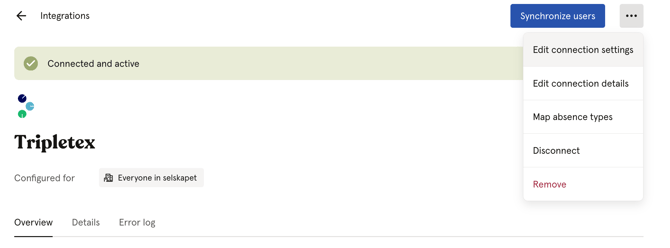
- Go to your integration in Huma under Integrations
- Click ··· and select "Edit connection settings"
- Enable "Positions: Create, update and delete"
- Click "Save"
⚠️ Only positions created or updated in Huma after position sync is activated will be transferred. Existing position data is not transferred retroactively.
💡 Whether position sync should be on or off depends on what kind of positions you are creating. Turn sync off when entering historical positions, and on when creating positions that are active from today or in the future.
FAQ
Does position sync transfer historical positions?
No. Only positions created or updated in Huma after position sync is activated are transferred.
If you need to enter historical positions, turn position sync off while you do so. Historical positions are not meant to be sent to your payroll system and may cause errors in the payroll timeline if transferred automatically. If you need historical data in your payroll system, you must enter it manually there.
What happens if I change a start date in Huma?
For integrations with employment history, changing a start date may result in a new position being created in your payroll system rather than the existing one being updated — since matching is based on start date. Review the result in your payroll system after making such changes.
What happens if the sync fails for one employee?
The sync continues for other employees. The failed employee is logged in the error log on the integration page in Huma. Fix the issue and re-sync.
Can I delete a position in Huma and have it deleted in my payroll system?
This depends on the integration. Some integrations support deletion, others do not. See your specific integration article for details.
Why is my position not showing up in my payroll system?
The most common reasons are: position sync was not enabled when the position was created, a required field is missing, or the start date overlaps with an existing position. Check the error log on the integration page in Huma for details.
🔗 Getting started with Payroll & accounting integrations.