
Table of Contents
- Roles and access
- What is a process in Huma?
- What can you use Processes for?
- Process templates created by Huma and partners
- Notifications
- FAQ
Roles and access
| Access | Role |
|---|---|
| Start, archive and delete processes for members of a group | User role: Miscellaneous → Processes |
| Start, archive and delete processes for the entire organisation | User role: Miscellaneous → Processes, with organisation-wide access |
| Create, edit and delete process templates | System role: Processes → Process template management |
💡 Users with a user role can only see and manage processes for employees in the groups they have been granted access over.
What is a process in Huma?
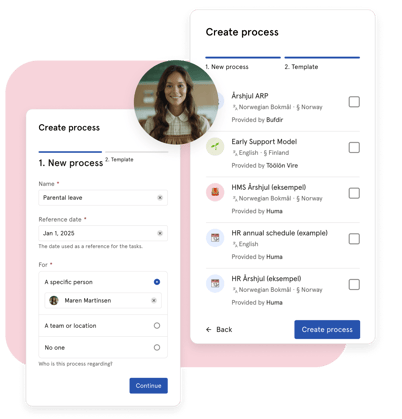
A process in Huma is a structured workflow with tasks that are distributed to the right people at the right time, based on a reference date. Processes are ideal for recurring or documented workflows that need oversight and consistent execution across teams, locations or the entire organisation.
Unlike onboarding and offboarding, processes are not tied to an employee starting or leaving. They can be started for any person, group or the entire organisation at any time and for any purpose.
🔗 Read more about how to work with processes in Huma.
What can you use Processes for?
Processes are flexible and can be used for a wide range of HR and organisational workflows. Here are some common examples:
-
HR annual schedules and planning cycles
Use the built-in HR annual schedule templates to structure recurring HR activities throughout the year, such as performance reviews, salary revisions, employee surveys and more. Templates are available for Norway, Sweden, Denmark and Finland. -
Sick leave follow-up
Processes provides ready-made templates for sick leave follow-up in accordance with legislation in Norway (NAV), Sweden (Försäkringskassan) and Finland (Kela). These are a great complement to the built-in sick leave follow-up in the Absence module.
-
Parental leave follow-up
Follow up employees on parental leave with structured tasks and reminders over a defined period. Templates are available in Norwegian, English, Danish and Swedish.
-
Reboarding
When an employee returns from a longer leave or transitions into a new role, Processes is the recommended module for reboarding in Huma. Unlike onboarding, processes do not require a new start date and can be started at any time.
-
Termination and downsizing
Manage termination processes in accordance with Norwegian legislation, including processes for both employee-initiated and employer-initiated terminations.
-
Underperforming employee follow-up
Structure follow-up processes for employees who need additional support or performance improvement plans.
-
Safety checklists and routines (HMS)
Use the HMS Årshjul template to manage recurring safety and compliance tasks throughout the year.
-
Any other structured, recurring workflow
Processes can be used for any workflow that benefits from structured tasks, clear responsibilities and oversight, such as security protocols, compliance checklists or internal audits.
Process templates created by Huma and partners
Huma provides a range of ready-made process templates created by Huma and trusted partners. These cover common HR scenarios across Norway, Sweden, Denmark and Finland. You will find them in the Templates tab in the Processes module.
- HMS Årshjul (example)
- HR Annual Schedule (example)
- HR Annual Schedule for managers
- NAV Sick Leave Follow-Up
- NAV / Altinn Sick Leave Follow-Up
- Downsizing / Termination Due to Business Conditions
- Termination Due to Employee Conduct
- Underperforming Employee Follow-Up
- Parental Leave Follow-Up
- Sick Leave Follow-Up
- Sick Leave Follow-Up
- Early Support Model
- Årshjul ARP
💡 Templates can be filtered by language and legislation in the Templates tab. You can also create your own templates or import templates from other organisations.
🔗 Read more about process templates.
Notifications
| Event | Who receives it |
|---|---|
| Process started | All users assigned to tasks in the process |
| Task assigned | The person, team or location the task is assigned to |
| Task due soon | The person assigned to the task, as a reminder before the deadline |
FAQ
How is Processes different from Onboarding and Offboarding?
Onboarding and offboarding are designed specifically for employees starting or leaving the organisation. Processes are more flexible and can be started for any person, group or the entire organisation at any time, without requiring a start or end date.
Can I use Processes for reboarding?
Yes, and it is the recommended approach. Processes is better suited for reboarding than the Onboarding module, since it does not require a new start date and can be started at any time for any employee.
How many processes can I run at the same time?
It depends on your subscription plan. On an Enterprise plan you can run unlimited processes. The Business plan includes 2 processes per year.